Reporting API v1.0 documentation
API introduction
Reporting api is provided for publishers accessing to ad performance data which can be easily used by generating customized report
- Path: https://www.bigossp.com/open/report/media/v1.0
- Method: POST
- Request format: application/json
- Response format: application/json
Interface authentication
The authentication is comprised of developerId and token which are given by BIGO. For details of authentication, please follow the below steps:
X-BIGO-DeveloperId : developerId,
X-BIGO-Sign' : `${sha1(`${developerId}-${now}-${token}`)}.${now}
How to generate sign:
- Step 1:Tie developerId、current timestamp and token up with '-' in the middle of each part
- Step 2:Encrypt the string originated from step 1 with SHA1 method and get an encrypted string
- Step 3:Connect encrypted string generated from step 2 and current timestamp mentioned by step 1 with '.' and get a sign string
- Step 4:Request with developerId and sign string,and this shall be like this:X-BIGO-DeveloperId 、X-BIGO-Sign
Sample: developerId=12345,token=abcdef, now=1576207584442
- Step 1:str = developerId+"-"+ now +"-"+ token= 12345-1576207584442-abcdef
- Step 2:encrypt = sha1(str) = 8c7373a816923639d248bf71d83f68b608a3b615
- Step 3:sign = encrypt + "." + now = 8c7373a816923639d248bf71d83f68b608a3b615.1576207584442
- Step 4:Add X-BIGO-DeveloperId=12345 and X-BIGO-Sign=8c7373a816923639d248bf71d83f68b608a3b615.1576207584442 in HTTPS Header
Demo:
private String encrypt(String developerId, String token, String time) {
        String src = developerId + "-" + time + "-" + token;
        String encypt = DigestUtils.sha1Hex(src.getBytes());
        return encypt;
    }
Notes:
- X-BIGO-Sign will expire in 24 hours, so you need to update sign once it gets expired
- The cache period is 5 minutes for the same request
- There is a 200 times query limits for every 10 minutes
- Users need to use timestamps in milliseconds. If the timestamp in seconds is used, the api response will indicate that sign has been expired
Request parameters
| Parameter | Format | Mandatory | Notes |
|---|---|---|---|
| startDate | String | Yes | yyyy-MM-dd |
| endDate | String | Yes | yyyy-MM-dd (Data is only available for latest 90 days and time period of each query shall be not exceeding 7 days) |
| pageNo | int | Yes | Paging query supported. pageNo indicates current page NO. and the minimum value is 1 |
| pageSize | int | Yes | pageSiz indicates the maximum quantity of data for this query response, 1 is mimimum, and 10000 is maximum. |
| indicators | List<String> | Yes | There are five indexs you can choose: clientReqCnt:ad request clientFillCnt:ad filled adImprCnt:ad impression adClickCnt:ad clicks eincome:revenue example:"indicators":["clientReqCnt","clientFillCnt","adImprCnt","adClickCnt","eincome"] |
| timezone | int | No | Multiple timezone supported such as 0 or -8 or 8, and 0 as default |
| aggregateType | int | No | Method of data aggregation. 1 = by hour 2 = by day |
| country | List<String> | No | Country code with two captive letters |
| pkgName | List<String> | No | Package name |
| appKey | List<String> | No | App id |
| appOs | List<String> | No | Example: "appOs":["Android","iOS","other"] |
| slotId | List<String> | No | Slot id |
| adType | List<String> | No | Ad type: 1 = "NATIVE" 2 = "BANNER" 3 = "INTERSTITIAL" 4 = "REWARD_VIDEO" 12 = "SPLASH_ADS" 20 = "POP_UP" example: "adType":["1","2","3","4","12","20"] |
| breakDowns | List<String> | No | Granularity, example: ["country", "pkgName", "appKey", "appOs", "slotId", "adType"] |
| orderBy | String | No | Sorting field, multiple fields are sorted with commas. For example: "appKey,slotId", parameter orderBy is recommended to be same with the breakDowns field |
Note:
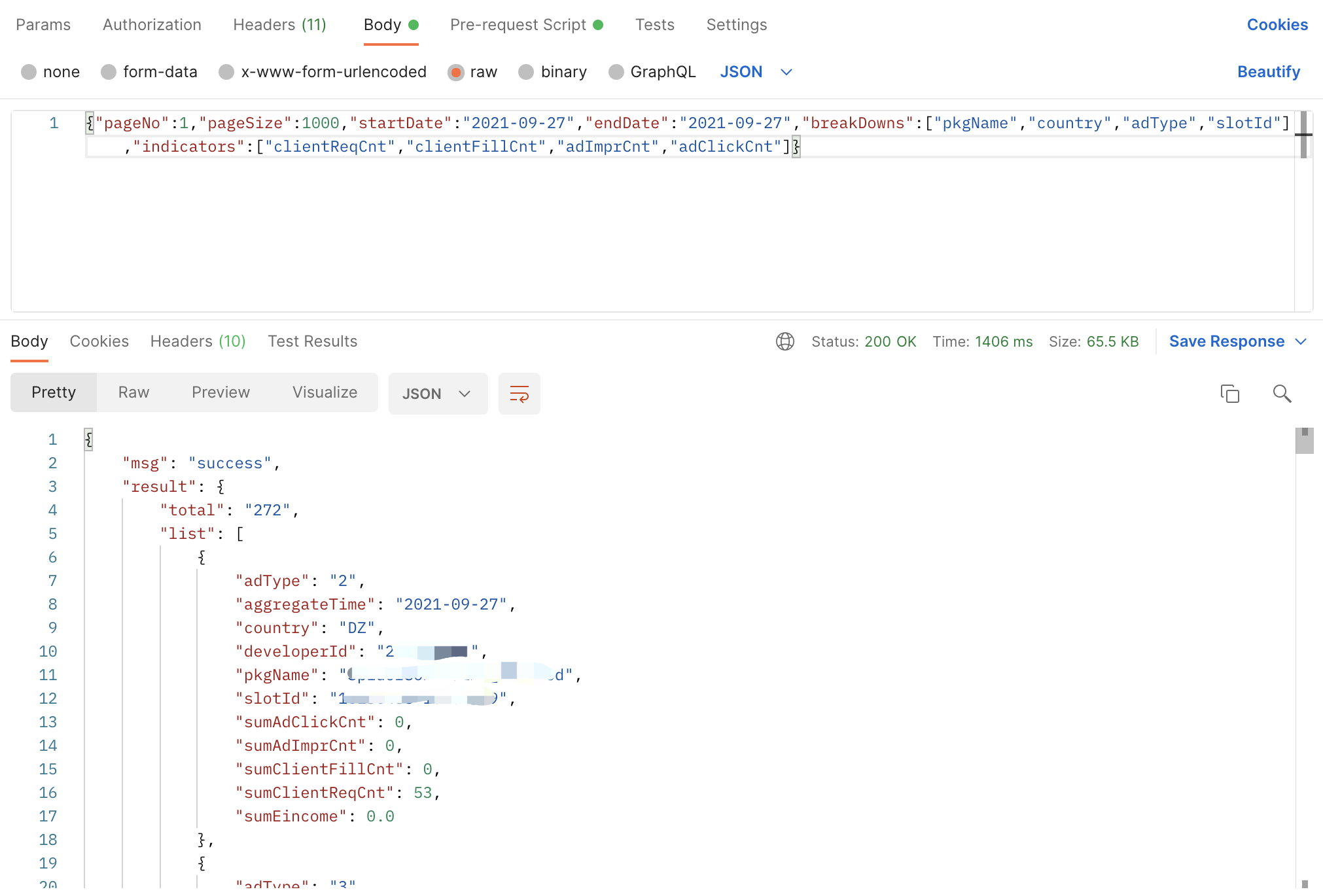
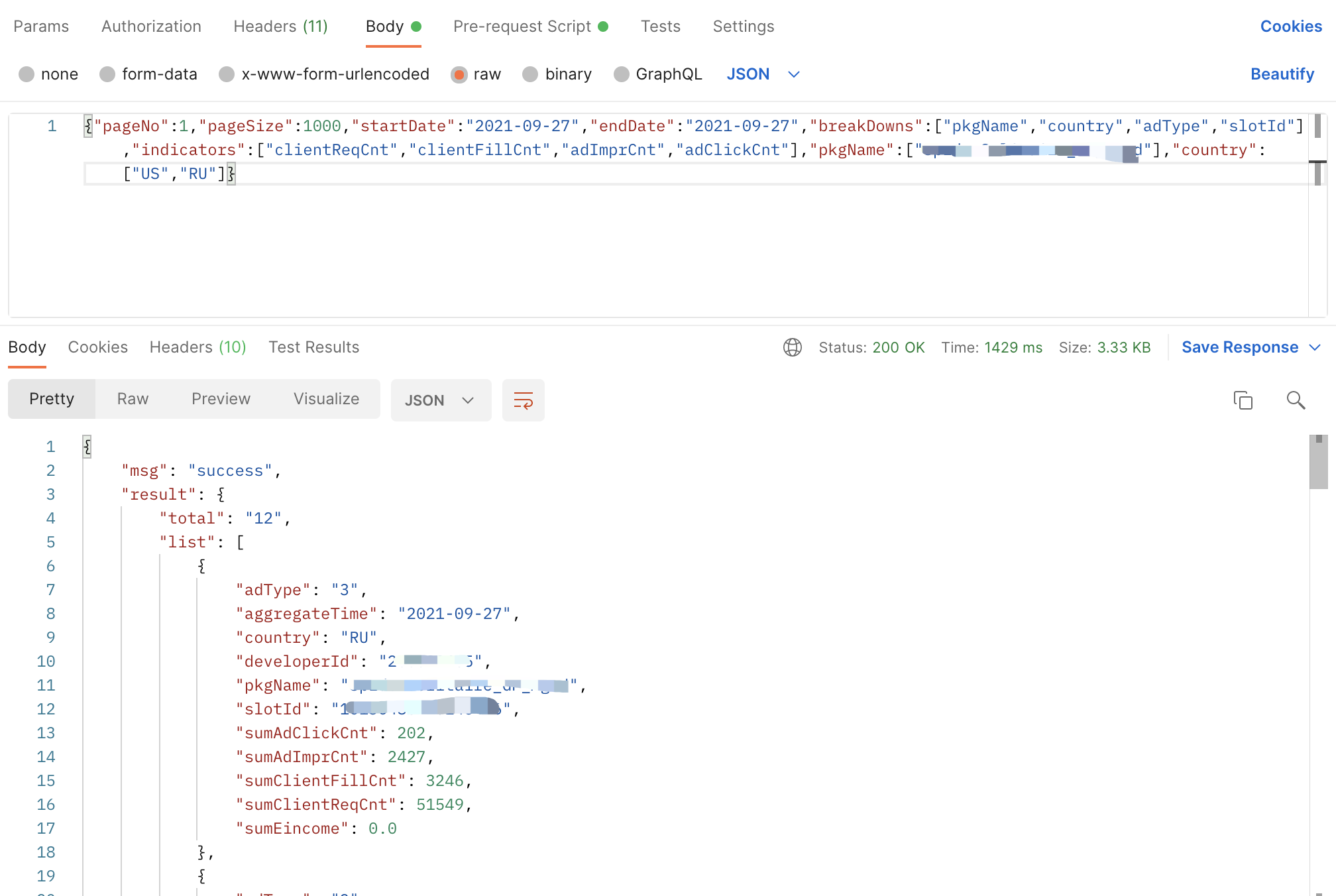
- API supports query with specific value of country、pkgName 、appKey、appOs 、slotId and adType, and you can request with breakDowns as well
- If the total number of data returned less than the pageSize threshold (10000), try to request once instead multiple.
- To avoid duplication of data in paging requests, the paging request parameters must include orderBy, and the orderBy field should be consistent with breakDowns. For example: "breakDowns":["appKey","slotId"],"orderBy":"appKey,slotId"
Response
| Parameter | Format | Notes |
|---|---|---|
| result | {"total": 10, "list": [.....]} | Result objects |
| status | Integer | 0 is success, and others are failure |
msg | string | Message |
| code | Integer | response code |
Result object:
| Parameter | Format | Notes |
|---|---|---|
aggregateTime | String | yyyy-MM-dd HH or yyyy-MM-dd |
country | String | country code |
developerId | String | developerId |
pkgName | String | pkgName |
appKey | String | appKey |
appOs | String | Android,iOS or other |
slotId | String | slot ID |
adType | String | native、banner、interstitial、rewarded video or mix |
sumClientReqCnt | Long | ad request count |
sumClientFillCnt | Long | ad filled count |
sumAdImprCnt | Long | ad impressions |
sumAdClickCnt | Long | ad clicks |
sumEincome | Double | ad revenue |
Response code:
| Code | Message |
|---|---|
| 100 | Success. Any other status code means the request has been unsuccessful |
| 101 | Sign verification failed |
| 102 | Invalid developerid |
| 103 | Invalid date |
| 104 | Exceed QPS limits |
| 105 | Invalid request param |
| 199 | Success. But no data available under the provided filtering conditions |
| system error | defalut error code |
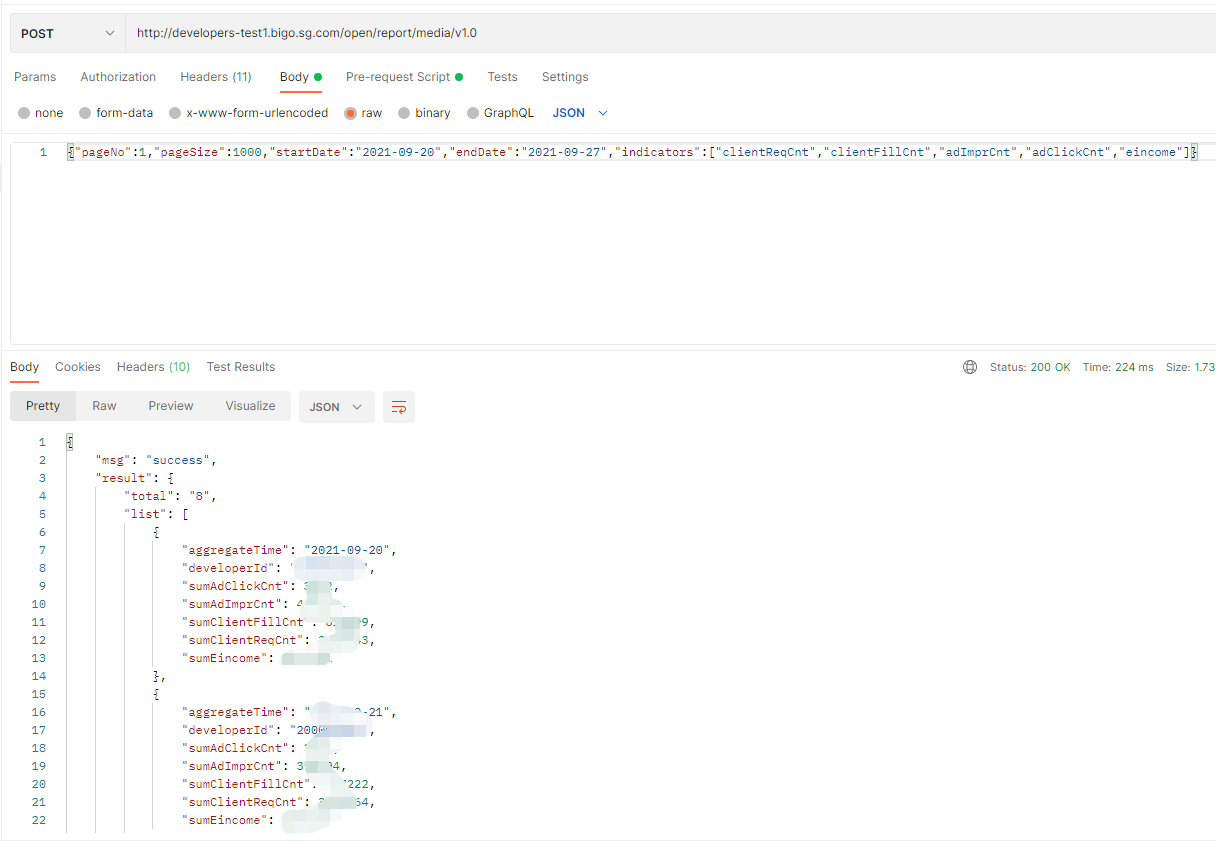
Sample of request and response
curl
Rquest:
curl -X POST
https://www.bigossp.com/open/report/media/v1.0
-H 'content-type: application/json'
-H 'X-BIGO-DeveloperId: 2*******5'
-H 'X-BIGO-Sign: 82******c17.16*******000'
-d '{"pageNo":1,"pageSize":1000,"startDate":"2021-09-27","endDate":"2021-09-27","indicators":["clientReqCnt","clientFillCnt","adImprCnt","adClickCnt","eincome"]}'
Response:
{
  "msg": "success",
  "result": {
    "total": "1",
    "list": [
      {
        "aggregateTime": "2021-09-27",
        "developerId": "2*****5",
        "pkgName": "S*****abc",
        "sumAdClickCnt": 3547,
        "sumAdImprCnt": 369693,
        "sumClientFillCnt": 529178,
        "sumClientReqCnt": 3544678,
        "sumEincome": 499.00
      }
    ]
  },
  "status": 0
}
Postman
Request url: https://www.bigossp.com/open/report/media/v1.0
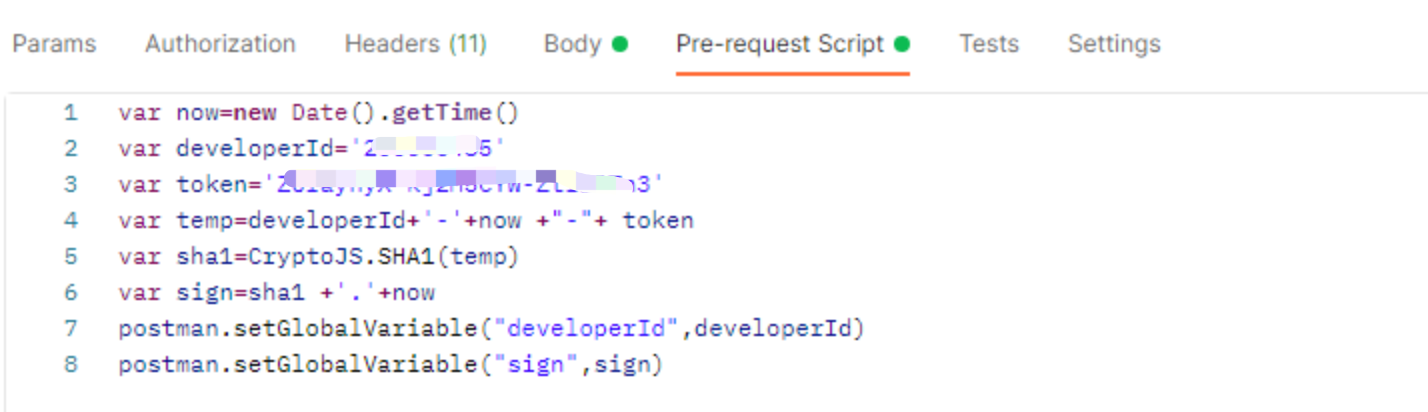
Pre-request Script generate Sign:
var now=new Date().getTime()
var developerId='2*******5'
var token='Z********3'
var temp=developerId+'-'+now +"-"+ token
var sha1=CryptoJS.SHA1(temp)
var sign=sha1 +'.'+now
postman.setGlobalVariable("developerId",developerId)
postman.setGlobalVariable("sign",sign)